The game industry has increasingly seen studios and publishers investing time and resources into porting projects, whether associated with remakes or not. In the scope of game development, a porting consists of adapting a game to a new platform. However, this definition covers very different scenarios. We may be talking about adapting a game that was originally developed for PC, to consoles such as Xbox and PlayStation, or migrating games built for older engines and hardware generations to modern platforms.
Although these scenarios share the same objective, each of them presents its own challenges, limitations, and lessons learned. These differences directly impact both UX and UI efforts, requiring experiences and adaptations that are consistent and appropriate for the new platform.
The first step in this type of project is understanding the system requirements. The adaptation basically involves any transition of a game between different platforms, for example, porting a game from consoles to mobile devices. Each port imposes distinct technical constraints and player expectations, influencing navigation as well as the way interfaces and controls should be designed.
More Than Just Translating the Control Mapping
The most common scenario when we talk about porting is adapting an existing game to another console within the same generation or an equivalent generation. For example, porting a game originally developed for Xbox to PlayStation 5 or Nintendo Switch 2. Compared to other types of porting, these are usually among the most straightforward processes, mainly because the gaming industry has already established interaction standards that are relatively similar across different console manufacturers.
However, this similarity does not eliminate the need for careful adaptation. One of the main focuses of the work at this stage is validating each platform’s requirements and terminology. Console manufacturers establish their own guidelines for naming conventions, button icons, system messages, and many other interface elements. For this reason, consulting the official documentation before starting development is an essential step to avoid rework and ensure certification requirements are met. (Important links are available at the end of the article.)
In addition to platform guidelines, it is very important to consider the exclusive features offered by each platform. These functionalities are usually part of the minimum requirements for publishing a game on their respective digital stores. Examples include Xbox Achievements and PlayStation Trophies and Activities. Understanding these requirements from the early stages of the project reduces risks during certification and helps avoid delays in the publishing process.
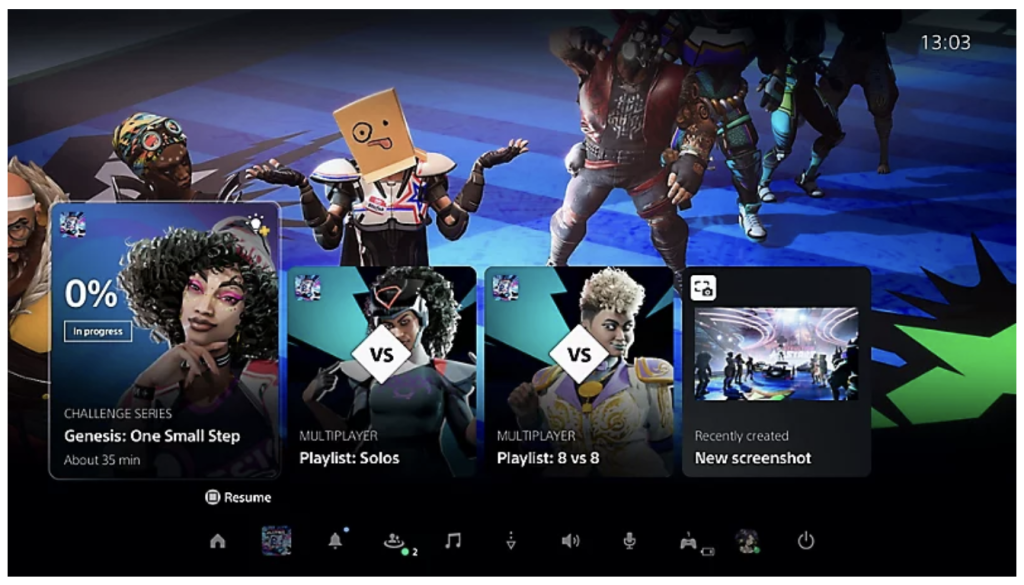
Example of PlayStation “Activities” on the Home Screen
The goal of this type of porting project should be to provide a consistent experience for players regardless of the console they choose. This means maintaining intuitive navigation, familiar control mappings, and a coherent interface across different versions while still taking advantage of the unique characteristics of each platform. Features such as the DualSense’s haptic feedback or the gameplay possibilities enabled by the detachable Joy-Cons are examples that can enrich the experience and provide a unique identity for each version of the game.
When the Controller Gives Way to the Touchscreen
Another scenario that has become increasingly common, mainly driven by the evolution of mobile hardware, is porting games originally developed for PC and consoles to smartphones and tablets. Unlike console-to-console adaptation, this is not simply about translating a control scheme, but rather about significantly restructuring the UI/UX experience.
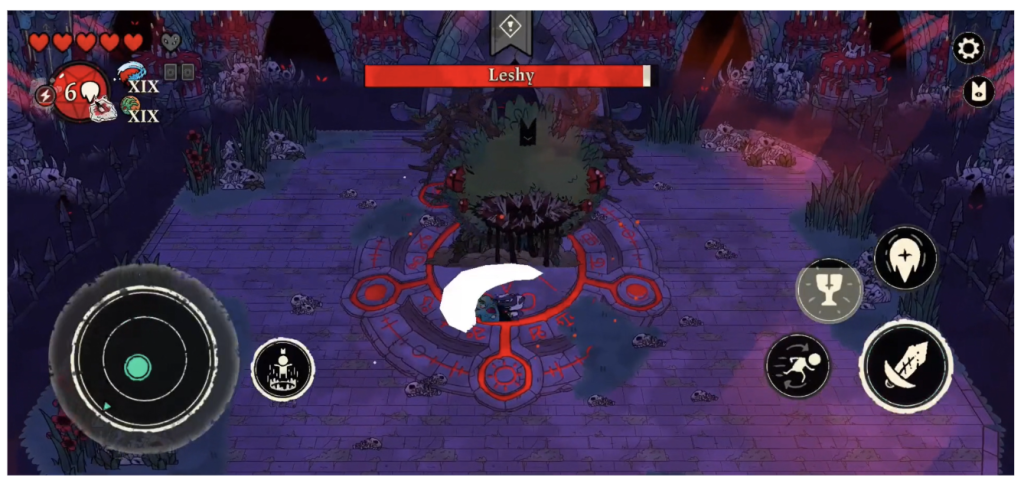
Cult of the Lamb – Arcade Edition
The first step in this process is defining how players will interact with the game on a touchscreen platform. In general, there are two main approaches that UI/UX designers can follow.
The first consists of reproducing physical controls through virtual buttons positioned on the HUD. This makes it easier to adapt existing mechanics, but it usually results in a cluttered interface, reduced usable screen space, and interference with both information readability and the overall gameplay experience.
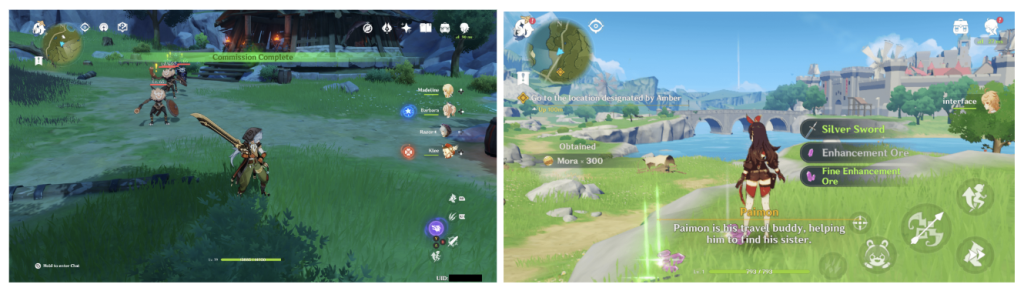
Comparison between Genshin Impact on Xbox and Mobile
The second alternative is to use gestures as the primary interaction method. This solution contributes to a cleaner and more immersive interface, but it also introduces challenges, such as the limitations imposed by each platform’s guidelines. Apple, for example, recommends avoiding complex gestures, encouraging interactions that are intuitive enough that players do not need to memorize a large number of gesture combinations.
In practice, these approaches rarely meet the needs of an entire game when used independently. The most common and recommended solution is to find a balance between them, using gestures for simple and frequent actions while relying on interface elements to support interactions that require greater precision, complexity, or clarity. Regardless of the chosen solution, it is essential to understand how similar games have solved comparable problems. Market research, benchmarking, and comparative testing help identify interaction patterns that players are already familiar with, reducing the risk of creating unusual or unintuitive interactions.
This challenge becomes even more evident in systems that were originally designed around a large number of physical buttons, such as building menus, object editing tools, or management interfaces. On consoles and PC, these features often rely on multiple button combinations. On mobile devices, however, this logic can rarely be reproduced effectively. As a result, UX work in these cases involves completely redesigning the interaction flow, reorganizing interface elements, prioritizing the tasks users perform most frequently, and reducing the number of steps required to complete the same action.
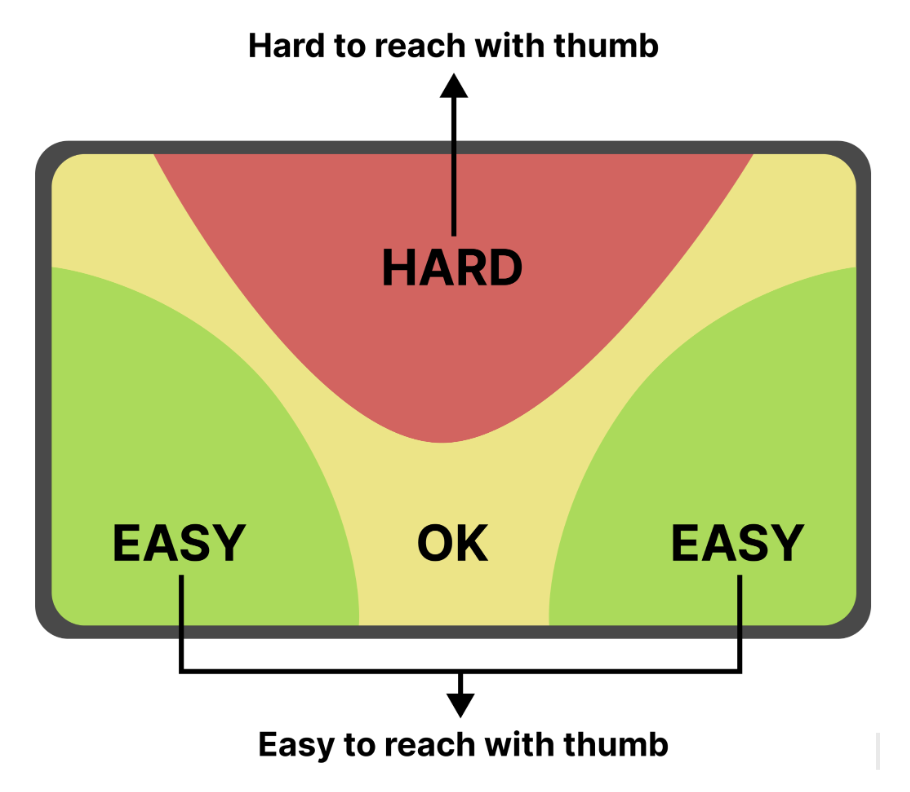
Another important aspect is adapting interfaces to significantly smaller screens. Most PC and console games are designed for widescreen monitors and televisions. On smartphones, the same interface will rarely work without adjustments. Elements need to be resized, reorganized, and in many cases simplified to ensure good readability and, most importantly, comfortable touch targets while always considering mobile ergonomics. The thumb zone, the area of the screen that can be most easily reached by the thumbs during normal use, should guide the placement of the most frequently used actions. Buttons that are used often or require quick responses generally provide a better experience when positioned near the lower edges of the screen, while secondary actions can occupy areas that are less accessible. The goal is not simply to adapt the interface to a new device, but to rebuild the experience so that it feels natural within the mobile context.
For these reasons, it is essential that the UI/UX team works closely with developers and game designers throughout the entire porting process. This collaboration creates better alignment regarding design solutions and the project’s technical constraints, ensuring that changes preserve the game’s identity without compromising the player experience.
Final Considerations
Although porting a game may appear to be simply a technical process of adapting a game from one platform to another, the reality is much more complex. Every platform brings different requirements, hardware limitations, certification guidelines, and player expectations regarding the overall experience. Together, these factors make UI/UX not just another production stage, but a fundamental part of creating a functional product.
The goal of this article was to explore some of the main challenges encountered throughout this process, whether adapting a game across different consoles or redesigning interfaces and interaction flows for mobile devices. One theme consistently emerged: successful porting is not just about making a game run on a new platform—it is about creating an experience that feels natural and native, free from friction and inconsistencies.
The purpose of this article was to present examples that broadly represent only part of the challenges involved in projects of this nature. Topics such as legacy interface modernization, control adaptation, graphical improvements, and adapting games to the technologies available on modern platforms also play a significant role in this field and deserve more in-depth discussion.
More than a conversion process, porting is an exercise in reinterpretation. When done carefully, it allows us to preserve the original identity of a game while delivering a renewed, consistent experience that meets players’ expectations on every platform.
References
Playstation: https://partners.playstation.net/
Xbox: https://learn.microsoft.com/en-us/xbox/
Nintendo: https://developer.nintendo.com/
Steam: https://partner.steamgames.com/doc/home
Epic: https://dev.epicgames.com/portal
Apple Arcade: https://developer.apple.com/apple-arcade/
Thumb zone: Thumb-Zone Optimization: Mobile Navigation Patterns That Reduced User Effort by 55%