By Julia Sigwalt, Senior Game Designer at Kokku
AI design is a fundamental part of video games. Essentially, it dictates how an actor responds to the player and how they encourage the player to react. A good AI can be the greatest difference between a game that feels good to play and is immersive, from a game that feels dull or janky.
AI stands for Artificial intelligence, a term that is very much in use nowadays. Not to be confused with Gen AI, Artificial intelligence is a broader term which also encapsulates a “simpler” type of AI, used in games since the 1950s. This AI also adapts to the user input and it’s a great tool to create challenge and surprise in games.
Now, you must be thinking: If I’m designing an AI, I should jump straight to the game engine and start coding right? Not really… In Game Design it’s a better practice to start things on paper, or your favourite tool for creating flowcharts and behaviour trees.
First you must determine what is the goal of this AI: Is it a stationary NPC, a passive companion, an ally who fights by your side, an enemy grunt, or a challenging boss? Then you must get a little deeper: How do you want this AI to make the player feel? Powerful, angry, compassionate? The answer to these questions will be the foundation for your AI behaviour.
Non Playable Character AI:
Let’s start with a simple example: A shopkeeper NPC. Its main goal is to allow the player to access an item shop. The second goal is to make it contribute to worldbuilding. Let’s say we want the player to like this character. That means we want the player to feel comfortable and happy. With that foundation we already know how the player will interact with this AI and a direction to add some flavour for the feeling we want to achieve.
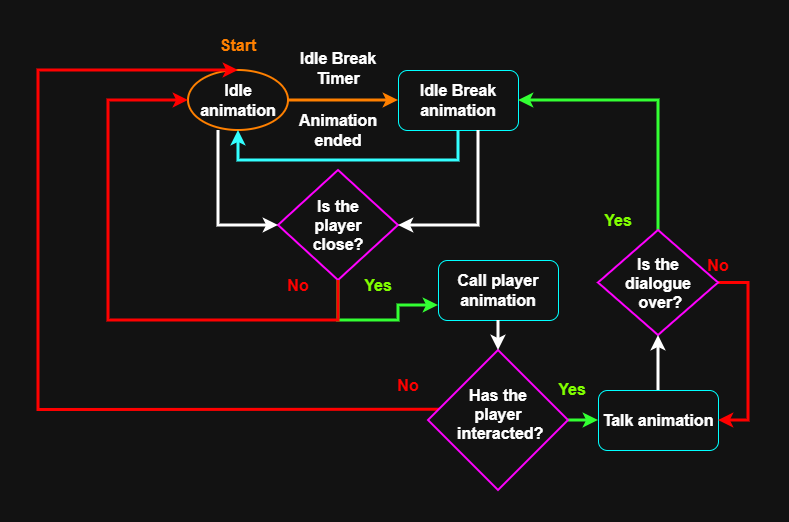
In this AI flow chart the NPC starts in its “Idle animation”. Every few seconds it changes to an “idle break animation”, to make the character feel more alive and add some personality to it. They could be carrying boxes or swiping the floor, you name it! When the animation is over, the NPC goes back to its idle animation, which usually loops on itself until the next break.
In order to motivate the player to interact with this NPC. We’ll make the NPC call the player’s attention. It could wave and say : “Hey traveler, I’ll give you a good discount today!”. In the flowchart you can see this represented by a pink polygon. It’s a condition, based on distance, that will determine if the NPC continues in its idle loop or if they will play the “Call animation”. Then, another decision is made. If the player interacts with the NPC, it should play a “Talk animation”. If not, they should return to the idle loop. And finally, the AI checks if the dialogue is over to decide if they continue talking or go back to the idle animation.
This example is simple, but it’s the foundation of a good AI. It has personality, encourages player behaviour and reacts to the player input. Visualizing this in a flowchart is great to keep things on record, especially when the AI gets more complex. It’s also a lot easier to make changes at this stage than later on when the game’s code is already done. So do your best to narrow down the experience at this stage.
Enemy AI:
Now for a more complicated example. How would an enemy AI work? When designing enemies it’s important to start by thinking about what tools the player has at their disposal. If the player can only jump and punch, like Rayman, the AI may react to the player’s jump by raising a shield above their heads, encouraging the player to punch instead. If the player can be stealthy, the AI gets more complicated. Especially if you’re aiming for realistic human behaviour. The goal of this AI is to make the player pay attention to the enemies’ sightlines, take cover and avoid making too much noise. The feelings we want to achieve are tension and a bit of pride, that comes from the feeling of mastery by the player.
To design a behaviour tree that properly responds to the player’s actions, it’s important to first define its senses: sight and hearing. There are many ways to design how they work, but to simplify we’ll use cones and circles. Here are visual representations of them:
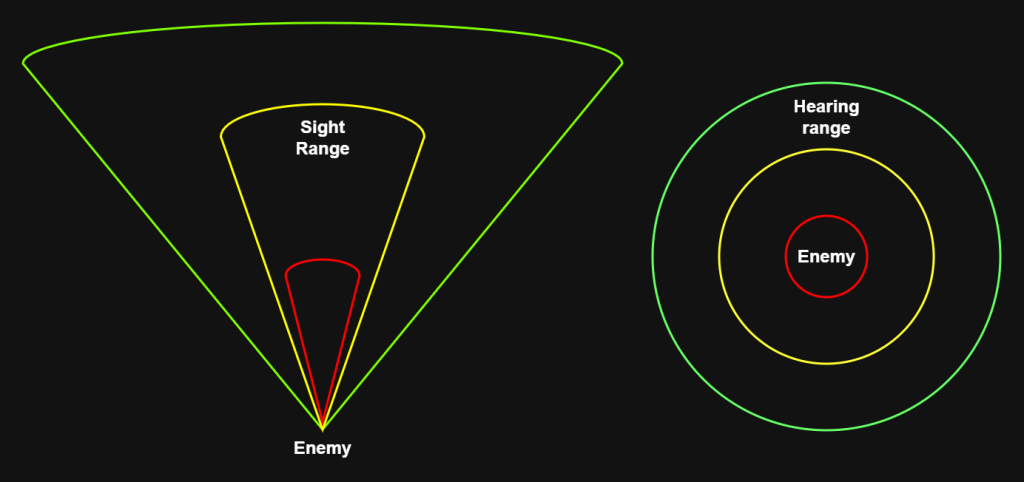
Here, the hearing is represented by circles and the sight is represented by cones. The green shapes represent a soft reaction, the player must produce a medium noise or stay in the cone area for a longer time to trigger the enemy to investigate. The yellow shapes represent an area where the enemies will instantly investigate, even if it’s a low noise or if the player just passes by, and the red shapes represent an area where the enemies will instantly get aggressive. The distinction between these 3 levels of perception is important so the enemies don’t appear to be blind and unreactive, while also not punishing the player with instant detection from too far.
This is a behaviour tree for the enemy soldier.
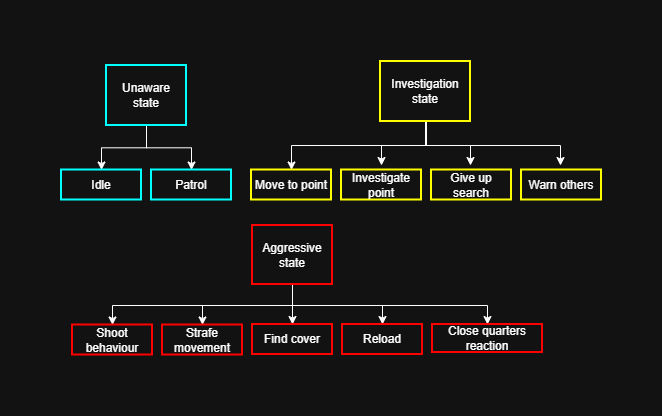
The behaviour tree is usually organised by states and behaviours. States represent different priorities and danger levels for the AI. In the Unaware state there are no threats. In the Investigation state there is a possible threat nearby, so relaxing is not an option. And the aggressive state means the enemy has been spotted and it is time to fight.
The behaviours are usually a mix of animations, visual effects and sound effects. There are conditions to be in a state, as there are conditions to play the behaviours within them. A behaviour tree is more flexible than an AI flowchart, because it allows the AI to quickly change between behaviours. It is constantly checking if the behaviours have the conditions necessary to be executed. In this example, shooting is the highest priority in the aggressive state, so it will play until the enemy needs to reload or needs to move closer to reach the player. Finding cover is important to keep the enemies realistic and pace the rhythm of combat, but it will only be called if the player is within range of shooting, so it’s less of a priority. Another thing that behaviour trees allow is for a dynamic change of priorities: In Halo, the AIs will have a higher priority of entering a vehicle if the player is driving one, instead of shooting, for example.
It is also possible to design an enemy AI through a flowchart, like the one we used for the NPC. Though this option makes the AI a bit more rigid, since exiting a behaviour and starting another one will depend on the connections between them. Here is an example:
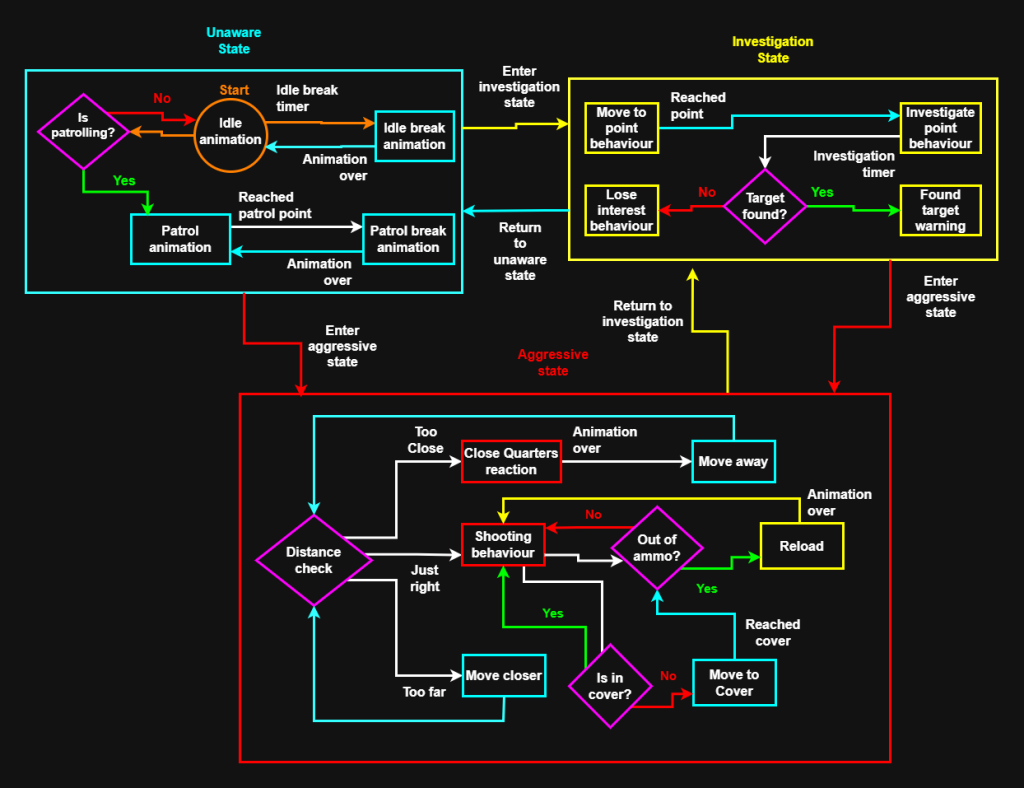
In the unaware state the enemy will alternate between its idle animation and idle break, unless it is set up to be patrolling. In that case it will alternate between the walking animation and the patrol break animations, which will play when it reaches a patrol point in the map and waits to move to the next one.
In the investigation state, the enemy will move to a point of interest, the point where the player made noise or the last point it “thinks” it saw the player. When reaching that point it starts an investigation behaviour, like looking around. Then there is a condition, if the player is found it will alert other enemies and enter the aggressive state. If it doesn’t, it will play a “give up” behaviour. and return to the unaware state.
In the aggressive state the enemy will be constantly making decisions regarding its distance in relation to the player. If the player is too close, it will try to defend itself with a kick and move away to a safe distance. If it’s too far it will try to move closer so it can start shooting. And if the range is just right, it will cycle between shooting and reloading. If the enemy is not in cover, it will find one, and if it is in cover it will remain there until the player is no longer in the right distance. If the player is out of sight for long enough, the enemy will lose track of the player’s position, and return to the investigation state, and if the player is not found, return to the unaware state.
Final thoughts:
Behaviour trees and flowcharts are great ways to prototype the AI of the actors of your game. Visualizing the connections and conditions is really important, not only for the design team, but for everyone involved in the process of game development. Behaviour trees allow the AI to think quickly, and allows using modifiers for the priorities. Flowcharts are more rigid and better for a tighter control of what is happening, when there are less variables involved.
The decision between using a behaviour tree and a flowchart will depend on the complexity of your game and how many factors your AI has to respond to. Decide what’s best for your AI, design the logic and only then jump to a game engine to prototype, test and refine.